



Happyjokers Login & Registration
Happyjokers login opens your account area, so you can return to games and manage your profile from one place. Registration creates that profile and links it to one email for recovery. We offer the service to players aged 18+, and we allow one account per person. The Happy Jokers layout works on desktop and mobile, so switching devices feels simple. We protect sessions with encryption, and our support team helps via live chat or email when you need a quick fix.


Registration at Happyjokers
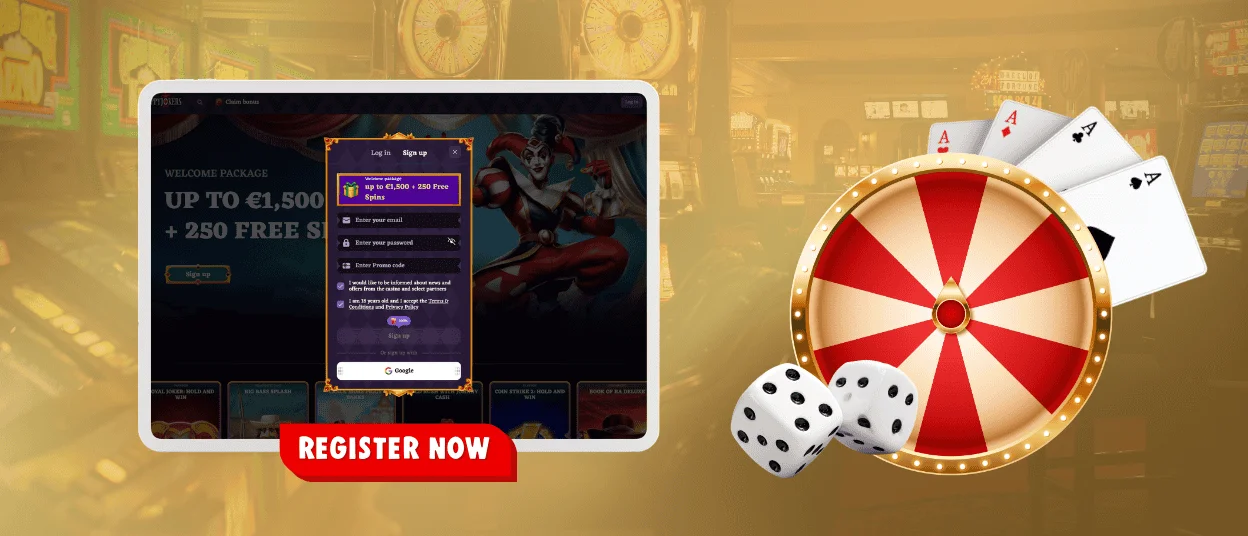
Create your account first if you are new. The Sign Up tab sits in the same window as the login form, so you can switch tabs without leaving the page. Open the Sign Up section inside Happyjokers login and fill in your real details, because they help with account recovery and future checks.
Use a valid email you control. It becomes your main recovery channel. Set a strong password and do not reuse it on other websites.
How to register (usual steps):
- Open the Sign Up tab and enter your email address.
- Create a password and confirm it if the form asks you to.
- Choose your country and currency if the form requires it.
- Add a promo code if you have one. Leave the field empty if you do not.
- Confirm you are 18+ and accept the Terms & Conditions and Privacy Policy.
- Submit the form, then follow any email confirmation prompt you see on screen.
What You Get After Registration
After you finish signing up, you can return to the Happyjokers login at any time and open your personal dashboard. This area keeps the tools you use during everyday play in one clear menu.
| Account area | What it gives you in practice |
| Game access | Start real-money sessions and save favorite titles for faster return |
| Cashier | Make deposits, request withdrawals, and check transaction status |
| Promotions | Activate offers and track bonus progress in one place |
| Limits | Set personal boundaries for spending or session time |
| Verification | Upload documents if we request KYC checks before a payout |
| Support | Contact the team through the help options shown in your profile |
Sign In and Manage Your Account
Use Happyjokers login with the same email and password you selected at registration. When the system notices a new device or network, it can ask for a quick confirmation step. This protects your account from unauthorized access.
In some cases, you may see a quick sign-in option in Happy Jokers login. Use it only when you created your account with that same method so you do not end up in the wrong profile.
Once you sign in, your account area helps you handle routine actions without extra searching. Players usually use it to:
- Check the balance and review recent play activity.
- Open the cashier and follow the deposit or withdrawal status.
- Read notices about promotions or verification in your account area.
- Update contact details when they change.
- Change your password and review security settings.
- Set limits or take a break in the responsible gaming section.
- Reach out to support and share screenshots when a page shows an error.
Forgot Password?
If you cannot remember your password, start from Happy Jokers login and click Forgot password? under the sign-in fields. Enter the email linked to your account and submit the request. We send a reset link to that inbox.
Open the latest reset email and set a new password. If you cannot find the message, check Spam and Promotions. Confirm you entered the correct email before you request a new link. When you no longer have access to your email, contact support and ask for secure account recovery.
Verification (KYC) and Account Checks
We use verification (KYC) to confirm that the account belongs to the right person. This step helps protect withdrawals and supports age and fraud checks. You may see a request before the first cashout or after sensitive changes, such as updating personal data.
After Happyjokers login, open your profile and follow the verification status shown there. We may ask for an ID document plus proof of address. Use clear photos and show the full document. Keep all corners visible. Make sure the details match your registration data. If the image is blurry, upload a new one to avoid delays.
How to Keep Your Account Safe
Keep your credentials private and protect your email inbox, because it controls password resets. Use Happy Jokers login only from the official website and avoid saving passwords on shared devices. Log out after each session on public computers, and lock your phone when you play on mobile data or public Wi‑Fi.
If you ever notice an unfamiliar login, change your password first. Then contact support and ask the team to review the account access history.
Common Problems and Quick Fixes
Most access issues come from simple causes, so you can solve them fast. If a page looks stuck, start with a refresh and a quick browser check before you change anything in your account.
Try these fixes first:
- Refresh the page and reopen the window if Happyjokers login does not load correctly.
- Switch between Wi-Fi and mobile data if the page keeps timing out.
- Try another browser. Safari works well on iOS, and Chrome works well on Android.
- Turn off strict ad blockers for the site if the form or confirmation step does not appear.
- Clear site data for Happyjokers in your browser settings if the page shows an old layout.
- Check Caps Lock and keyboard language when the password keeps failing.
If the issue continues, contact support and include your device, browser, and a screenshot of the message you see. This helps the team give you the right fix faster.
FAQ
Can I create more than one account if I use different emails?
No. We allow one account per player. Extra accounts can trigger checks and may limit promotions or payments. If you think you already signed up, use Happyjokers login and reset your password.
Why does the system say “email already in use” during registration?
The email already belongs to an existing account. Check spelling and remove spaces. If the email is correct, open Happyjokers login and use the password reset link.
Can I change my email address after registration?
Email changes affect account security. In many cases, you cannot edit this field instantly in the profile. Contact support from your account menu and ask for an email update, then follow the confirmation steps the team provides.
Do I need to complete KYC before I can play?
You can usually browse the lobby and play according to the rules of your account. We request KYC mainly to protect withdrawals and sensitive account actions. When the system asks for documents, upload them from your profile and wait for the status to update.
What should I do if I keep getting signed out after I log in?
Close extra tabs and sign in again in one active window. Allow cookies for the site, because they keep your session stable. If the problem continues, clear site data in your browser and try again, or contact support with the time and device details.


